
Website Navigation - Website Navigation Structure
Adding consistent navigation to your website is a MUST! After visiting many genealogy sites, one thing I have noticed is that a number of them include only a  button and
  button. This is especially true if the site has been created with a genealogy database program. The more complex your site, the more important good navigation is. Make your navigation easy to use. Remember, your navigation is the road map to your site and people will not always enter via your "front door." A search engine could take them anywhere within your site. Will they be able to find there way around?
Google's information for Webmasters states "Make a site with a clear hierarchy and text links. Every page should be reachable from at least one static text link."
Position of Navigation Structure -
- Decide on the position of your navigation and be consistent throughout your site.
- Top or close to the top (Family Genealogy Online uses this type of site navigation) as well as a sidebar menu.
- Left side of your page (Genealogy Computer Tips uses a left side and top site navigation)
- Right side of the page (Help for the Beginning Web Author use a right side site navigation)
Style of Navigation Structure -
- Decide what type of navigation you will use -
- Text links - biggest advantage is quick download time and it is the most search engine friendly. Text navigation can be primary navigation OR an additional navigation method. This site uses plain text links throughout. The top and bottom menus are examples as is the right side menu (when used). The menus are styled using CSS.
- Plain text links within a table.
 Screenshot of plain text links inserted in a table or a styled list Screenshot
 - Graphic images as navigation buttons. If you use graphic buttons, you should also offer a plain text menu. Screenshot of graphic buttons
- Dropdown menus. If you chose to use menus created with javascripts, you should always provide an alternate plain text menu.
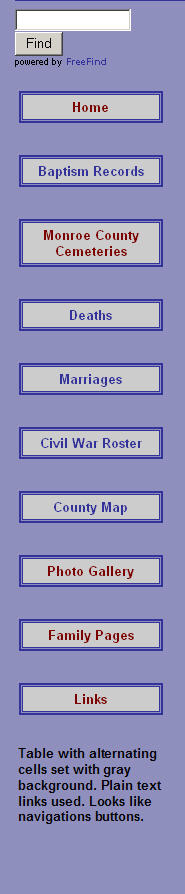


Appearance of Navigation Structure -
- Be consistent with the color of navigation menus. As you browse through this site, the color and style of the menus never changes.
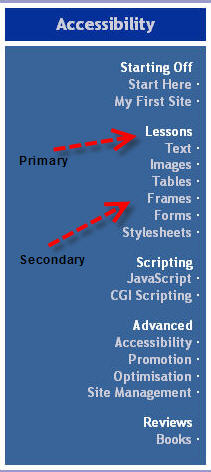
- Be consistent with the appearance of navigation structure. Primary navigation goes first and secondary navigation should be placed just below primary navigation. Screenshot of primary and secondary links.
Navigation Tips -
- Let the viewer know where they are on your site by using breadcrumbs or informative page titles. How many times have you seen Index, Home or New Page 1 as the title in the browser title bar. Add the title to the current page between the title tags in the head section of your code.

Figure 1: Breadcrumb

Figure 2: <title>New Page 1</title>

Figure 3: <title>Genealogy Web Creations and Web Design - Website Design for the Genealogist </title>
- Internal linking - placing links to internal pages within the content of the page.
Example: Research by Barbara Eakley asks the question "Could Sarah's maiden name have actually been COX?" Documentation for the Cox Graham link. {Link opens in new window}
- Titles of navigation links should be short, descriptive and intuitive and refer to the target page. Don't use Click Here. Instead use brief but meaningful link text that explains what the link offers. Example:
Instead of To download W3C's editor/browser Amaya, click here. Use To download Amaya, go to the Amaya Website and get the necessary software.
Additional References -
- Website Navigation - Website navigation is important to the success of your website visitor’s experience to your website. The website’s navigation system is like a road map to all the different areas and information contained within the website. by S. R. Emerson
- Website Navigation from HTMLSource
- Nifty Navigation Using CSS
Using Includes for Navigation Structure
- Do you have content that you want to appear on more than one page, like your navigation structure? You can use includes - included content - to make inserting and updating your navigation structure simple. If you are using FrontPage or Expression Web to design and maintain your website, the FrontPage Include Web Component or Expression Web Include can be used. If you are hand coding your pages, you can use Server Side Includes.
- Step-by-step instructions - Expression Web Design Time Includes
- Step-by-step instructions - Server Side Includes Tutorial - SSI.
- How to Make a Navigation Menu
Planning a Genealogy Website 2nd Edition is available as a 42 page EBook in pdf format for you to download. It has been totally revised and updated with new content. The EBook is zipped for faster download. Save it to your desktop, extract the file and it is ready to use.


April 2007 - April 2013

Disclosure: This is an affiliate link, which means that if you visit Bluehost.com through this link and purchase this product, I’ll get a commission.